はじめに
過去に、現用で動いているIPsecを構成しているRTの片方を更改する作業を行いました。新しい機器に代わるものの、設定は引き継がれる設計だったため、予め設定を投入して電源を入れておき、ケーブルを振り替える方法で切り替えを行いました。
この作業で重要なポイントは、「IPsecのピアはどの程度の時間で切り替わるか」ということ。機器を取り換えた後に再構成するまでの時間が、システムのダウン時間に直結することになります。切り替えの結果は、5~10分程度の時間を要しました。
実際の切り替えの時にはPPPoEも再接続されたので、「機器の入れ替えを入れ替えとピアの再構成に時間がかかったのか」「PPPoEの再接続で時間を消費したのか」がハッキリしない状況になりました。なお、PPPoEは「show ppp all」でIPが取得できていることは確認できましたが、対向のグローバルIPアドレスに飛ぶはずのPingが飛ばないという事象が発生していました。「PPPoEのせいか?」という疑念はあるものの、前者の機器を入れ替えるとピア再構成に時間がかかる可能性もあるので、今回検証しました。
なお、上記の切り替えの本番時には「clear crypto isakmp 」でピアのリセットを行い、IPsec通信を発生させるパケットをエンド同士で流し続けていました。リセットをかけた後、IPsecの該当パケットを投げることでピアを再構成することは検証で確認していましたが、本番前の検証時は機器を変えず同じRT同士で見ていたので、機器を変えるということを今回やろうと思いました。
検証
使用するルータはCisco 891fj です。IOSはversion 15.4です。
構成
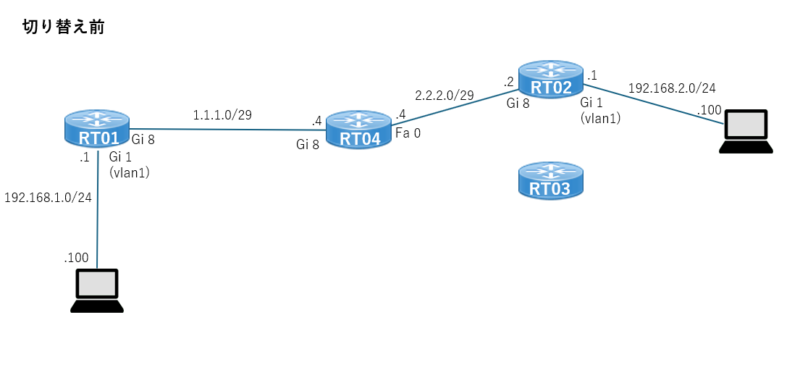
切り替え前
元の状態の構成図は下記の通り。
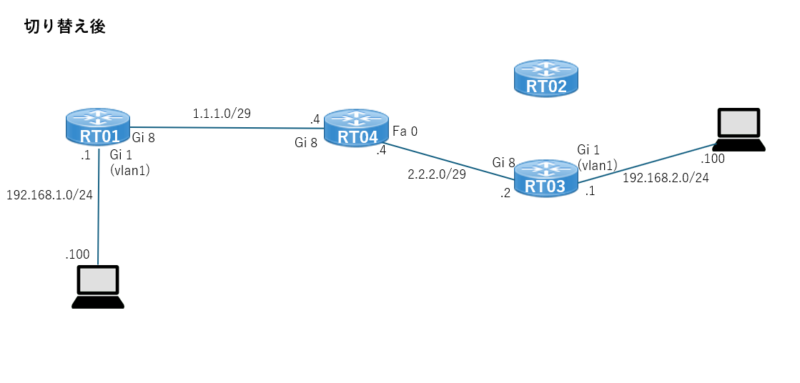
切り替え後
切り替え後の構成図は下記。
RT02とRT03のIPsec設定は同じため、ケーブルを差し替えるだけでエンド同士の通信はできる想定。
切り替わりに必要な時間がどの程度必要か本検証で確認したい。
設定
※管理用(ログイン用)にVLAN99を作成しています。VLAN99はIPsecの設定には関係はありません。
流し込みConfig
以下、検証設定のために実行コマンドです。
RT03はRT02と同じものを使うので割愛します。
RT01 流し込みconfig
conf t
crypto isakmp policy 1
 encryption aes
 hash sha
 authentication pre-share
 group 2
crypto isakmp key Password address 2.2.2.2
crypto isakmp keepalive 30 periodic

crypto ipsec transform-set IPSEC esp-aes esp-sha-hmac
 mode tunnel

crypto map ipsec-setting 1 ipsec-isakmp
 set peer 2.2.2.2
 set transform-set IPSEC
 match address Allow-ipsec

interface GigabitEthernet8
no shutdown
ip mtu 1372
ip tcp adjust-mss 1332
ip address 1.1.1.1 255.255.255.248
crypto map ipsec-setting

interface Vlan1
ip address 192.168.1.1 255.255.255.0

ip access-list extended Allow-ipsec
 10 permit ip 192.168.1.0 0.0.0.255 192.168.2.0 0.0.0.255

ip route 0.0.0.0 0.0.0.0 GigabitEthernet8
RT02 流し込みconfig
conf t
crypto isakmp policy 1
 encryption aes
 hash sha
 authentication pre-share
 group 2
crypto isakmp key Password address 1.1.1.1
crypto isakmp keepalive 30 periodic

crypto ipsec transform-set IPSEC esp-aes esp-sha-hmac
 mode tunnel

crypto map ipsec-setting 1 ipsec-isakmp
 set peer 1.1.1.1
 set transform-set IPSEC
 match address Allow-ipsec

interface GigabitEthernet8
no shutdown
ip address 2.2.2.2 255.255.255.248
ip mtu 1372
ip tcp adjust-mss 1332
crypto map ipsec-setting

interface Vlan1
ip address 192.168.2.1 255.255.255.0

ip access-list extended Allow-ipsec
 10 permit ip 192.168.2.0 0.0.0.255 192.168.1.0 0.0.0.255

ip route 0.0.0.0 0.0.0.0 GigabitEthernet8
RT04 流し込みconfig
conf t

interface GigabitEthernet8
no shutdown
ip address 1.1.1.4 255.255.255.248

interface FastEthernet0
no shutdown
ip address 2.2.2.4 255.255.255.248
sh run
sh runの実行結果を載せておきます。
RT01 # sh run
RT01#sh run
Building configuration...

Current configuration : 2524 bytes
!
! Last configuration change at 16:03:22 UTC Thu Mar 13 2025 by admin
!
version 15.4
service timestamps debug datetime msec
service timestamps log datetime msec
service password-encryption
!
hostname RT01
!
boot-start-marker
boot-end-marker
!
!
logging buffered 512000
enable secret 5 $1$WJFk$6QRnNnLWC.ajxzqfzkYi4/
!
no aaa new-model
memory-size iomem 15
!
!
!
!
!
!
!
!
!
!
!
!
!
!
no ip domain lookup
ip domain name orange.local
ip cef
no ipv6 cef
!
!
!
!
!
multilink bundle-name authenticated
!
!
!
!
!
!
!
!
cts logging verbose
license udi pid C891FJ-K9 sn FGL2505LDK2
!
!
vtp mode transparent
username admin password 7 1218011A1B05
!
!
!
!
!
vlan 99
!
ip ssh version 2
!
!
crypto isakmp policy 1
 encr aes
 authentication pre-share
 group 2
crypto isakmp key Password address 2.2.2.2
crypto isakmp keepalive 30 periodic
!
!
crypto ipsec transform-set IPSEC esp-aes esp-sha-hmac
 mode tunnel
!
!
!
crypto map ipsec-setting 1 ipsec-isakmp
 set peer 2.2.2.2
 set transform-set IPSEC
 match address Allow-ipsec
!
!
!
!
!
!
interface BRI0
 no ip address
 encapsulation hdlc
 shutdown
 isdn termination multidrop
!
interface FastEthernet0
 no ip address
 shutdown
 duplex auto
 speed auto
!
interface GigabitEthernet0
 no ip address
!
interface GigabitEthernet1
 no ip address
!
interface GigabitEthernet2
 no ip address
!
interface GigabitEthernet3
 no ip address
!
interface GigabitEthernet4
 no ip address
!
interface GigabitEthernet5
 no ip address
!
interface GigabitEthernet6
 no ip address
!
interface GigabitEthernet7
 switchport access vlan 99
 no ip address
!
interface GigabitEthernet8
 ip address 1.1.1.1 255.255.255.248
 ip mtu 1372
 ip tcp adjust-mss 1332
 duplex auto
 speed auto
 crypto map ipsec-setting
!
interface Vlan1
 ip address 192.168.1.1 255.255.255.0
!
interface Vlan99
 ip address 192.168.99.3 255.255.255.0
!
interface Async3
 no ip address
 encapsulation slip
!
ip forward-protocol nd
no ip http server
no ip http secure-server
!
!
ip route 0.0.0.0 0.0.0.0 GigabitEthernet8
!
ip access-list extended Allow-ipsec
 permit ip 192.168.1.0 0.0.0.255 192.168.2.0 0.0.0.255
!
!
!
control-plane
!
!
mgcp behavior rsip-range tgcp-only
mgcp behavior comedia-role none
mgcp behavior comedia-check-media-src disable
mgcp behavior comedia-sdp-force disable
!
mgcp profile default
!
!
!
!
!
!
!
line con 0
 login local
 no modem enable
line aux 0
line 3
 modem InOut
 speed 115200
 flowcontrol hardware
line vty 0 4
 login local
 transport input all
!
scheduler allocate 20000 1000
!
!
!
end
RT01#sh run
Building configuration…
RT02 # sh run
RT02#sh run
Building configuration...
Current configuration : 2500 bytes
!
! Last configuration change at 15:51:33 UTC Thu Mar 13 2025 by admin
!
version 15.4
service timestamps debug datetime msec
service timestamps log datetime msec
service password-encryption
!
hostname RT02
!
boot-start-marker
boot-end-marker
!
!
enable secret 5 $1$Vkhk$mzfGeEt/yBY7LMijPoV21/
!
no aaa new-model
memory-size iomem 15
!
!
!
!
!
!
!
!
!
!
!
!
!
!
no ip domain lookup
ip domain name orange.local
ip cef
no ipv6 cef
!
!
!
!
!
multilink bundle-name authenticated
!
!
!
!
!
!
!
!
cts logging verbose
license udi pid C891FJ-K9 sn FGL2505LDK4
!
!
vtp mode transparent
username admin password 7 070E25414707
!
!
!
!
!
vlan 99
!
ip ssh version 2
!
!
crypto isakmp policy 1
 encr aes
 authentication pre-share
 group 2
crypto isakmp key Password address 1.1.1.1
crypto isakmp keepalive 30 periodic
!
!
crypto ipsec transform-set IPSEC esp-aes esp-sha-hmac
 mode tunnel
!
!
!
crypto map ipsec-setting 1 ipsec-isakmp
 set peer 1.1.1.1
 set transform-set IPSEC
 match address Allow-ipsec
!
!
!
!
!
!
interface BRI0
 no ip address
 encapsulation hdlc
 shutdown
 isdn termination multidrop
!
interface FastEthernet0
 no ip address
 shutdown
 duplex auto
 speed auto
!
interface GigabitEthernet0
 no ip address
!
interface GigabitEthernet1
 no ip address
!
interface GigabitEthernet2
 no ip address
!
interface GigabitEthernet3
 no ip address
!
interface GigabitEthernet4
 no ip address
!
interface GigabitEthernet5
 no ip address
!
interface GigabitEthernet6
 no ip address
!
interface GigabitEthernet7
 switchport access vlan 99
 no ip address
!
interface GigabitEthernet8
 ip address 2.2.2.2 255.255.255.248
 ip mtu 1372
 ip tcp adjust-mss 1332
 duplex auto
 speed auto
 crypto map ipsec-setting
!
interface Vlan1
 ip address 192.168.2.1 255.255.255.0
!
interface Vlan99
 ip address 192.168.99.4 255.255.255.0
!
interface Async3
 no ip address
 encapsulation slip
!
ip forward-protocol nd
no ip http server
no ip http secure-server
!
!
ip route 0.0.0.0 0.0.0.0 GigabitEthernet8
!
ip access-list extended Allow-ipsec
 permit ip 192.168.2.0 0.0.0.255 192.168.1.0 0.0.0.255
!
!
!
control-plane
!
!
mgcp behavior rsip-range tgcp-only
mgcp behavior comedia-role none
mgcp behavior comedia-check-media-src disable
mgcp behavior comedia-sdp-force disable
!
mgcp profile default
!
!
!
!
!
!
!
line con 0
 login local
 no modem enable
line aux 0
line 3
 modem InOut
 speed 115200
 flowcontrol hardware
line vty 0 4
 login local
 transport input all
!
scheduler allocate 20000 1000
!
!
!
end
RT04 # sh run
RT04#sh run
Building configuration...
Current configuration : 1991 bytes
!
! Last configuration change at 09:30:07 UTC Thu Mar 13 2025 by admin
!
version 15.4
service timestamps debug datetime msec
service timestamps log datetime msec
service password-encryption
!
hostname RT04
!
boot-start-marker
boot-end-marker
!
!
enable secret 5 $1$bAlC$CYqdi73zMml1PZfAOldV1/
!
no aaa new-model
memory-size iomem 15
!
!
!
!
!
!
!
!
!
!
!
!
!
!
no ip domain lookup
ip domain name orange.local
ip cef
no ipv6 cef
!
!
!
!
!
multilink bundle-name authenticated
!
!
!
!
!
!
!
!
cts logging verbose
license udi pid C891FJ-K9 sn FGL2505LDKP
!
!
vtp mode transparent
username admin password 7 020700560208
!
!
!
!
!
vlan 99
!
ip ssh version 2
!
!
!
!
!
!
!
!
!
!
!
!
interface BRI0
 no ip address
 encapsulation hdlc
 shutdown
 isdn termination multidrop
!
interface FastEthernet0
 ip address 2.2.2.4 255.255.255.248
 duplex auto
 speed auto
!
interface GigabitEthernet0
 no ip address
!
interface GigabitEthernet1
 no ip address
!
interface GigabitEthernet2
 no ip address
!
interface GigabitEthernet3
 no ip address
!
interface GigabitEthernet4
 no ip address
!
interface GigabitEthernet5
 no ip address
!
interface GigabitEthernet6
 no ip address
!
interface GigabitEthernet7
 switchport access vlan 99
 no ip address
!
interface GigabitEthernet8
 ip address 1.1.1.4 255.255.255.248
 duplex auto
 speed auto
!
interface Vlan1
 no ip address
!
interface Vlan99
 ip address 192.168.99.6 255.255.255.0
!
interface Async3
 no ip address
 encapsulation slip
!
ip forward-protocol nd
no ip http server
no ip http secure-server
!
!
!
ip access-list extended Allow-ipsec
!
!
!
control-plane
!
!
mgcp behavior rsip-range tgcp-only
mgcp behavior comedia-role none
mgcp behavior comedia-check-media-src disable
mgcp behavior comedia-sdp-force disable
!
mgcp profile default
!
!
!
!
!
!
!
line con 0
 login local
 no modem enable
line aux 0
line 3
 modem InOut
 speed 115200
 flowcontrol hardware
line vty 0 4
 login local
 transport input all
!
scheduler allocate 20000 1000
!
!
!
end
確認①(切り替え前)
まず、切り替え前の構成のときのステータス確認。「sh crypto isakmp sa」と「sh crypto ipsec sa」でIPsecが構成できている状態であることを確認します。
RT01#sh crypto isakmp sa
IPv4 Crypto ISAKMP SA
dst             src             state          conn-id status
2.2.2.2         1.1.1.1         QM_IDLE           2003 ACTIVE

IPv6 Crypto ISAKMP SA

RT01#sh crypto ipsec sa

interface: GigabitEthernet8
    Crypto map tag: ipsec-setting, local addr 1.1.1.1

   protected vrf: (none)
   local  ident (addr/mask/prot/port): (192.168.1.0/255.255.255.0/0/0)
   remote ident (addr/mask/prot/port): (192.168.2.0/255.255.255.0/0/0)
   current_peer 2.2.2.2 port 500
     PERMIT, flags={origin_is_acl,}
    #pkts encaps: 54, #pkts encrypt: 54, #pkts digest: 54
    #pkts decaps: 30, #pkts decrypt: 30, #pkts verify: 30
    #pkts compressed: 0, #pkts decompressed: 0
    #pkts not compressed: 0, #pkts compr. failed: 0
    #pkts not decompressed: 0, #pkts decompress failed: 0
    #send errors 0, #recv errors 0

     local crypto endpt.: 1.1.1.1, remote crypto endpt.: 2.2.2.2
     plaintext mtu 1310, path mtu 1372, ip mtu 1372, ip mtu idb GigabitEthernet8
     current outbound spi: 0x691C82E3(1763476195)
     PFS (Y/N): N, DH group: none

     inbound esp sas:
      spi: 0x9A9F4B68(2594130792)
        transform: esp-aes esp-sha-hmac ,
        in use settings ={Tunnel, }
        conn id: 1, flow_id: Onboard VPN:1, sibling_flags 80004040, crypto map: ipsec-setting
        sa timing: remaining key lifetime (k/sec): (4222977/2645)
        IV size: 16 bytes
        replay detection support: Y
        Status: ACTIVE(ACTIVE)

     inbound ah sas:

     inbound pcp sas:

     outbound esp sas:
      spi: 0x691C82E3(1763476195)
        transform: esp-aes esp-sha-hmac ,
        in use settings ={Tunnel, }
        conn id: 2, flow_id: Onboard VPN:2, sibling_flags 80004040, crypto map: ipsec-setting
        sa timing: remaining key lifetime (k/sec): (4222973/2645)
        IV size: 16 bytes
        replay detection support: Y
        Status: ACTIVE(ACTIVE)

     outbound ah sas:

     outbound pcp sas:

RT01#ping 192.168.2.1 source 192.168.1.1
Type escape sequence to abort.
Sending 5, 100-byte ICMP Echos to 192.168.2.1, timeout is 2 seconds:
Packet sent with a source address of 192.168.1.1
!!!!!
Success rate is 100 percent (5/5), round-trip min/avg/max = 1/2/4 ms
確認②(切り替え後)
ケーブルをRT02からRT03に振り替えます。以下のコマンドでIPsecをリセットします。
RT01#clear crypto isakmp
RT01#clear crypto sa

RT01#sh crypto ipsec sa

interface: GigabitEthernet8
    Crypto map tag: ipsec-setting, local addr 1.1.1.1

   protected vrf: (none)
   local  ident (addr/mask/prot/port): (192.168.1.0/255.255.255.0/0/0)
   remote ident (addr/mask/prot/port): (192.168.2.0/255.255.255.0/0/0)
   current_peer 2.2.2.2 port 500
     PERMIT, flags={origin_is_acl,}
    #pkts encaps: 0, #pkts encrypt: 0, #pkts digest: 0
    #pkts decaps: 0, #pkts decrypt: 0, #pkts verify: 0
    #pkts compressed: 0, #pkts decompressed: 0
    #pkts not compressed: 0, #pkts compr. failed: 0
    #pkts not decompressed: 0, #pkts decompress failed: 0
    #send errors 0, #recv errors 0

     local crypto endpt.: 1.1.1.1, remote crypto endpt.: 2.2.2.2
     plaintext mtu 1310, path mtu 1372, ip mtu 1372, ip mtu idb GigabitEthernet8
     current outbound spi: 0x0(0)
     PFS (Y/N): N, DH group: none

     inbound esp sas:

     inbound ah sas:

     inbound pcp sas:

     outbound esp sas:

     outbound ah sas:

     outbound pcp sas:

RT01#ping 192.168.2.1 source 192.168.1.1
Type escape sequence to abort.
Sending 5, 100-byte ICMP Echos to 192.168.2.1, timeout is 2 seconds:
Packet sent with a source address of 192.168.1.1
.....
Success rate is 0 percent (0/5)
ケーブル自体は振り替わっていて、設定も入っているので、あとはどの程度の時間がかかるかを見ます。
対向に対してPingを行います。すると、すんなりPingが成功しました。
RT01#ping 2.2.2.2
Type escape sequence to abort.
Sending 5, 100-byte ICMP Echos to 2.2.2.2, timeout is 2 seconds:
!!!!!
Success rate is 100 percent (5/5), round-trip min/avg/max = 1/1/4 ms

RT03#ping 1.1.1.1
Type escape sequence to abort.
Sending 5, 100-byte ICMP Echos to 1.1.1.1, timeout is 2 seconds:
!!!!!
Success rate is 100 percent (5/5), round-trip min/avg/max = 1/2/4 ms
ステータス確認。IPsecができていますね。
RT01#sh crypto isakmp sa
IPv4 Crypto ISAKMP SA
dst             src             state          conn-id status
2.2.2.2         1.1.1.1         QM_IDLE           2004 ACTIVE

IPv6 Crypto ISAKMP SA
結論
この後再度RT02に戻す、またRT03に変えるを繰り替えましたが、切り替えに5分以上かかるといったことはなかったです。ただ、対向のグローバル(今回は1.1.1.1、2.2.2.2)に行うことで切り替わりが起ったので、すぐにIPsecのstateを「QM_IDLE」にするには、対向への疎通性がキーになりそうです。既に書きましたが、PPPoEはできているように見えていましたが、実際に通信ができているようになったという確認まではできていなかったので、このあたりの疎通性をもう少し見れていれば良かったです。
とはいえ、この手の切り替えで学べたのは、すぐに切り替わるだろうという楽観は禁物ということです。